
If you own a small business, you’ve probably seen the ads. AI automation, AI employees, AI receptionists, and AI sales agents. Entire AI systems promising to follow up with leads, book appointments, send emails, manage customers and practically run your business.
Some come with hefty setup fees and another $100, $500 or even thousands of dollars a month.
I use AI every day, and I’m not saying these services are all bad. My problem is that many business owners don’t know what they’re actually buying or how much of it is really AI.
A lot of the processes being sold as “AI automation” have already been automated for years.
Your CRM, email platform, scheduler and other software already do most of what these new AI platforms are promising to do.
So before you invest in another AI platform, ask yourself:
“What needs to happen consistently in my business that isn’t happening now?”
Then figure out whether the software you already own can do it.
Prefer to Watch? AI Automation for Small Business
I also covered this topic on YouTube, including why I think small businesses should get a lot more skeptical about the “AI employees” and expensive AI systems being marketed to them right now.
If you’d rather watch than read, you can see the full video below.
What Is AI Automation for Small Business?
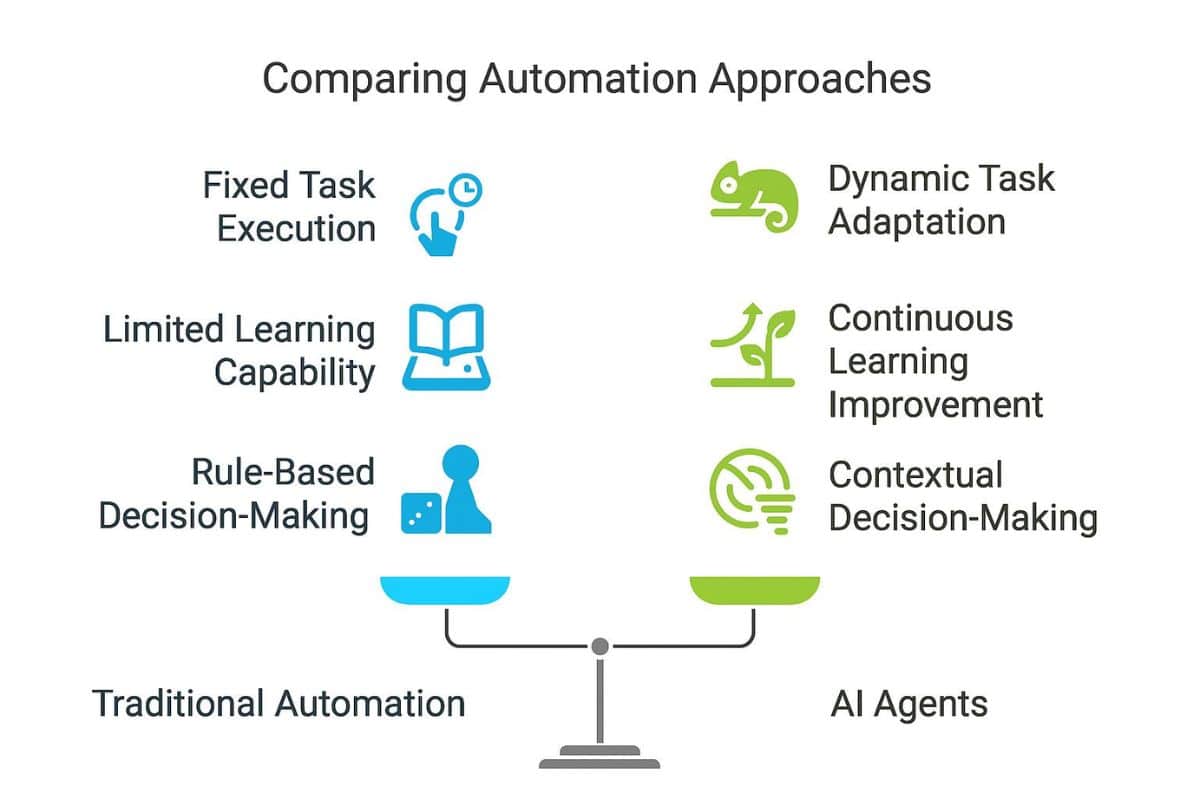
Part of the confusion around AI automation is that three different things keep getting lumped together.
Artificial Intelligence
AI is best at work that requires some thought: analyzing information, finding patterns, interpreting, comparing and generating content.
Traditional Automation
Automation follows predictable rules:
When X happens, do Y.
Send an email. Add a tag. Move information. Send a reminder. Follow up three days later.
AI Agents
AI agents take this a step further. They connect AI to other systems so it can make decisions and take actions based on the information it receives.
The easiest way to think about it is that automation follows a set of rules, while AI interprets information. AI agents combine the two by using AI to decide what action to take within connected systems.
For example, an automation can send a rebooking reminder six weeks after a client’s appointment. AI can analyze your sales data and identify customers who are likely candidates for an upsell. An AI agent can read an incoming inquiry, determine what the person needs, and take an action such as sending a response or updating the CRM.
AI Employees and AI Automation Platforms: What Are You Really Buying?

There’s a lot of money being made right now selling AI to small businesses. Some of these platforms come with hefty setup fees and recurring subscriptions that run from hundreds to thousands of dollars a month.
What isn’t always obvious is what’s underneath the hood.
Some “AI employee” platforms are built from software that already exists: a CRM such as HighLevel, an LLM such as ChatGPT or Claude, and automation tools like Zapier or Make.
In most cases, the software is completely white-labeled and sold under another company’s brand.
There’s nothing wrong with paying someone to put those pieces together. Good implementation has value. But before you invest thousands of dollars, you should know whether you’re buying proprietary technology or paying for existing tools to be packaged and configured for you.
Questions to Ask Before Buying an AI Automation Platform
- What is this built on?
- Which parts actually use AI?
- Which parts are ordinary automation?
- Who owns my accounts and data?
- What happens to everything if I cancel?
- Do I actually need everything included?
AI vs. Automation: Which One Does Your Business Need?
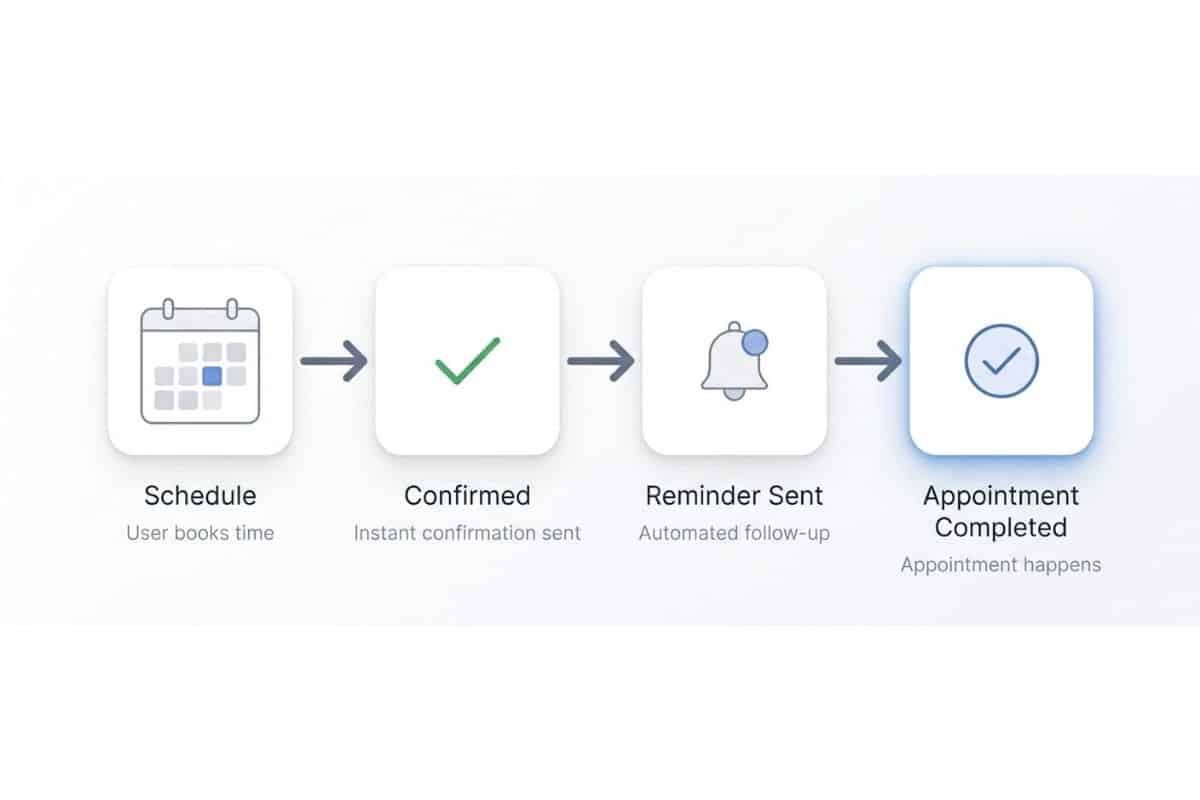
A good rule of thumb is to use AI when the job requires some thought and automation when you need something predictable to happen consistently.
| AI is good for | Automation is good for |
| Analyze | Send |
| Interpret | Tag |
| Generate | Remind |
| Find patterns | Trigger |
| Compare information | Move information |
| Organize messy information | Repeat predictable processes |
Most businesses have plenty of jobs that fall squarely into that second column. For example:
- Esthetician: Six weeks since an appointment → send a rebooking reminder.
- Dietitian: A program ends → send an email about the next step.
- Chiropractor: A patient hasn’t rebooked → send a reminder.
- Attorney: A consultation is booked → send preparation instructions.
- Local business: A quote is sent → follow up three days later.
None of those requires AI. They require automation.
Far too many AI companies are “selling” AI but delivering automations.
Does AI Automation Save Small Businesses Time?

AI is supposed to save time, but you have to count the time spent researching, learning, prompting, troubleshooting, checking, correcting and maintaining whatever you build.
This played out recently with a client of mine who used Claude to code a quiz for her website.
She spent hours and hours building it, only to end up paying my team to finish the job.
First, we had to fix the broken code. Then we had to figure out how to integrate the clunky custom quiz into her WordPress website. After that, we still had to connect it to her email platform and build the tags and automations that sent people the right follow-up based on their quiz results.
What’s frustrating is that WordPress quiz plugins are built to do all of this. For about $47 plus a few hours of professional setup, she could have had a working quiz, website integration and email automation without writing a line of code.
Instead, she spent hours building it herself, then paid for hours of development and integration work to make the custom solution function like an off-the-shelf plugin.
The question isn’t whether AI can do something. It’s whether using AI makes more sense than the cheap, boring tool that was built to do that job in the first place.
Are AI Agents Safe for Small Businesses?

If ChatGPT gives you a bad answer, you can read it, catch the mistake and move on. Giving an AI agent access to your business is an entirely different level of risk.
Now you’re potentially giving it access to your email, customer records, private files, website, financial information and other systems, along with permission to take action without your approval.
We’ve all seen what happens when AI goes wrong. It makes up facts, gets names wrong, invents details, completely misses the tone, or spits out something so weird and robotic that no sane person would send it to a client.
When you’re using ChatGPT to draft an email or write a blog post, you see that garbage before anyone else does. You fix it or throw it away.
An AI agent with access to your business is a different story.
It can send the garbage. It can also expose private client information, change or delete records, spend money, break systems that were working just fine, and piss off customers before you even know something went wrong. Now you don’t have a copywriting problem. You have a financial, privacy or reputation problem.
Some of the AI failures are pretty serious. One AI coding agent deleted a company’s entire production database and its backups in nine seconds, leaving customers without access to reservations and other critical information.
And those are the failures we know about.
Small business owners are also sharing their own stories in forums: AI sending emails they didn’t approve, customer-support agents leaking conversation history and businesses losing customers after turning too much of their support over to AI.
The more access and control you give an AI agent, the more damage it can do when it gets something wrong.
For a predictable business process where X should always trigger Y, I’d rather use an automation designed to do exactly that.
Small Business Automation Tools You Probably Already Have

Before you add another monthly subscription, take a good look at the software you’re already paying for. Most small businesses barely scratch the surface of what these tools can automate.
Your CRM or Practice Management Software
Platforms like Practice Better, Healthie, Jane, Vagaro and GlossGenius already have automation built in. Depending on the platform, that includes appointment and form reminders, intake paperwork, payments, onboarding, follow-up, rebooking and review requests.
Before you pay for an “AI client retention system,” check the client retention tools already sitting inside your software.
Your Email Marketing Software
ActiveCampaign, Kit and MailerLite aren’t just for sending newsletters. They can deliver your freebies, run welcome and nurture sequences, segment subscribers, follow up with people based on their interests, promote offers, re-engage inactive subscribers and bring former customers back.
If you have a freebie but aren’t sure what should happen after someone downloads it, grab my You Have a Freebie…Now What? guide. You’ll get the tech checklist, and you’ll also get to see this type of automation working in real life.
Your Scheduling Software
Calendly, Acuity and the scheduler inside your CRM can do more than put appointments on your calendar. You can automate confirmations, preparation instructions, reminders, rescheduling information, no-show follow-up and messages after the appointment.
Zapier and Other Integration Tools
Sometimes the automation you need involves two pieces of software that don’t naturally talk to each other. That’s where tools like Zapier come in.
The basic idea is still when X happens, do Y. The difference is that X happens in one piece of software and Y happens in another.
For example:
- Someone pays through Stripe → add or update them in your email software → tag them as a customer → start onboarding.
- Someone books through Calendly → add or update them in your CRM → create the appropriate follow-up task.
- Someone fills out a website form → add them to your CRM or email platform → tag them based on what they asked about → send a response → notify your team.
None of this is new or particularly glamorous, but it gets the job done without turning every routine business process into another AI project.
What Should You Automate in Your Business?
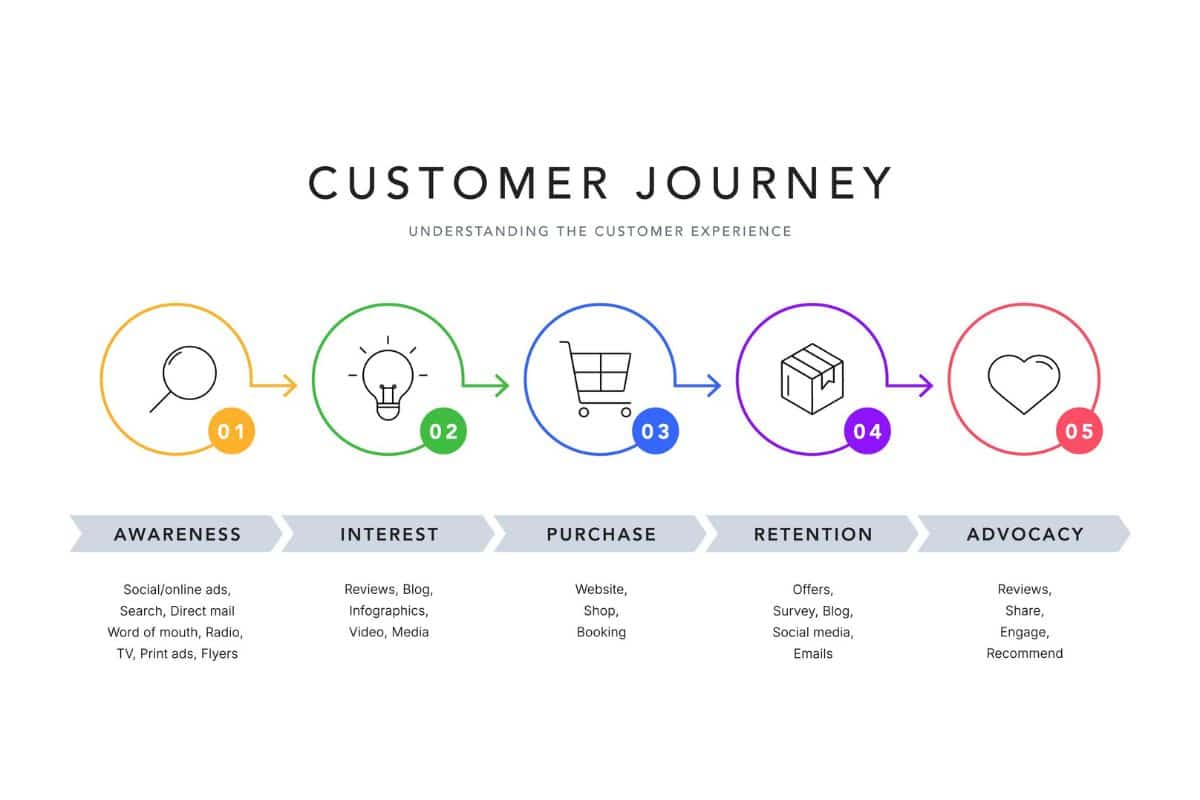
Instead of looking for places to add AI, walk through your customer lifecycle and look for the places where things aren’t happening as consistently as they should.
Lead → Appointment
What happens after someone downloads your freebie, fills out an inquiry form or starts booking but doesn’t finish? Are they followed up with, or are you hoping they remember to come back?
Appointment → Customer
Once someone books, what happens next? Think about confirmations, reminders, forms, preparation instructions and follow-up after the appointment.
Customer → Repeat Customer
If someone doesn’t rebook, what happens? A simple reminder at the right time can bring back customers who otherwise disappear.
Happy Customer → Review or Referral
When are you asking happy customers for reviews and referrals? If the answer is “whenever I remember,” that’s a pretty good candidate for automation.
Former Customer → Returning Customer
What happens to customers you haven’t seen in six months or a year? Your former customers already know you, so don’t leave reconnecting with them entirely to chance.
Once you map this out, the automation opportunities tend to become pretty obvious. Start with the places where people, money or follow-up are currently falling through the cracks.
Want the review and referral system already mapped out for you?
I have ready-to-use Review & Referral Kits in my Etsy shop for both health and wellness practices and beauty businesses. They include the follow-up systems, scripts, templates and marketing pieces you need to turn happy customers into more reviews, referrals and repeat business without having to build everything from scratch.
[Shop the Review & Referral Kits on Etsy →]
When Should You Use AI?
I use AI every day. The trick is using it for jobs where its ability to work through information actually saves you time.
AI is great for things like:
- Analyzing data
- Researching a topic
- Brainstorming ideas
- Drafting content
- Summarizing long documents or conversations
- Finding patterns you might miss
- Comparing large amounts of information
- Organizing messy notes, data or ideas
These are jobs where I want the software to look at information, make sense of it and give me something useful back. That’s very different from asking it to send the same appointment reminder every Tuesday.
How to Use AI to Analyze Your Business Data

Most businesses are sitting on a ton of useful information that nobody has the time to sort through manually. AI can take thousands of rows, answers, comments or transactions and find patterns that are hard to see when you’re looking at them one at a time.
For example, AI can help you with:
- Subscriber + sales data: Find non-buyers, repeat buyers, inactive customers and upsell opportunities.
- Client intake forms: Find the problems paying clients most often come to you to solve.
- Comments, reviews + surveys: Find common complaints, questions, wants and themes across hundreds of responses.
- Sales + appointment data: Spot buying patterns based on season, time of month, holidays or other timing.
- Marketing + sales data: Find which campaigns, freebies or traffic sources actually produce customers.
That’s the kind of work where AI saves me serious time. I’m not asking it to perform a routine task that software can already automate. I’m giving it a pile of information and asking it to help me see what’s in there.
How to Use AI to Find Business Automation Opportunities
AI is also useful for figuring out what you should automate in the first place.
Give it a list of the software you already pay for and a brain dump of the repetitive things you do every week or month. Then let AI help you find the best opportunities before you start building anything.
Here’s a prompt you can copy and paste:
I want to automate more of my business using software I already pay for.
Software I use:
[LIST YOUR SOFTWARE]
Tasks I regularly do:
[BRAIN DUMP YOUR WEEKLY/MONTHLY TASKS]
Review this list and identify the five highest-impact opportunities to automate repetitive work using the software I already have.
Prioritize automations that will save time, improve follow-up, prevent things from falling through the cracks, or help generate or retain revenue.
Do not recommend new software.
For each recommendation, tell me what should be automated, which of my existing tools can do it, what triggers the automation, what happens next and roughly how difficult it is to set up.
Once you have the five ideas, pick one and ask AI to walk you through how it works in the software you already have.
Use AI to help identify and plan the automation. It doesn’t need to be the automation or build the whole thing from scratch.
AI and HIPAA Compliance for Health and Wellness Practices
Since we work with health and wellness practices at D&A, HIPAA is something we have to think about when we build automations, integrations and marketing systems.
It’s not enough for an AI company to say its product is “HIPAA compliant.” You need to know what information is being shared, where it’s going, which systems can access it, whether PHI is involved and whether the appropriate Business Associate Agreements (BAAs) are in place.
That matters with AI, but it also matters when you’re connecting your practice management software to your email platform, CRM, Zapier or anything else in your tech stack.
You can absolutely use AI and automation in a healthcare business. You just need to build the system with HIPAA in mind from the beginning, rather than trying to patch privacy and compliance problems afterward.
Start With the Business Problem, Not the Technology

Before you invest in another AI platform, start with the problem you’re trying to solve.
- Find where leads, customers or money are falling through the cracks.
- Decide what should happen instead.
- Check the software you’re already paying for.
- Automate predictable tasks with predictable automation.
- Add AI where you actually need it to analyze, interpret or make sense of information.
- If setting it up yourself costs more time than it’s worth, hire someone who knows how to build it.
A lead magnet is a perfect example. Someone downloads your freebie. Then what?
They should get the resource, enter the right welcome or nurture sequence, receive relevant follow-up and eventually get a clear next step toward working with you. None of that requires an AI employee. It requires a good system.
If you have a freebie but the “now what?” part is fuzzy, grab my free You Have a Freebie…Now What? guide. It includes the tech checklist for setting up the follow-up, and you’ll get to see the process in action when you download it.
And if reading all of this has made you realize you have a dozen places where things are falling through the cracks, but you have zero interest in spending your weekend figuring out tags, triggers and integrations, that’s what we do at Delegate & Accelerate.
We’ll look at what you already have, what needs to happen and what can be automated before we start adding more software to the pile.
Frequently Asked Questions About AI Automation for Small Business
Is AI automation worth it for small businesses?
Yes, when AI is solving a problem that requires AI. It’s great for analyzing data, finding patterns, researching, drafting and working through large amounts of information. But if you need to send a reminder, follow up with a lead or start an email sequence, automation is usually a better tool for the job.
What is the difference between AI and business automation?
Traditional automation follows rules you set in advance, such as sending an email three days after an appointment. AI interprets information, finds patterns and generates responses based on what it receives. AI agents combine the two by using AI to make decisions and then take actions inside connected systems.
What should a small business automate first?
Start with places where leads, customers or money are falling through the cracks. Look at lead follow-up, appointment reminders, onboarding, rebooking, review and referral requests, abandoned inquiries and follow-up with former customers. These are usually more valuable than automating something just because you do it often.
Do small businesses need AI agents to automate their business?
No. Most small businesses can automate a huge amount with the CRM, email marketing platform, scheduling software and other tools they already use. AI agents make more sense when a process genuinely requires interpretation or decision-making rather than a predictable “when X happens, do Y” rule.
Need Help Figuring Out What to Automate?
If you’re looking at your business and realizing there are plenty of things that should be happening automatically but aren’t, that’s where D&A comes in.
We build the boring stuff that makes your business work: follow-up systems, email automations, client onboarding, rebooking and retention systems, integrations, funnels and the connections between the software you already use.
We’ll look at what you have, find where things are falling through the cracks and figure out the simplest way to fix it. If your existing software can do the job, we’ll use it. If AI makes sense, we’ll use that too.
You don’t need more software. You need the right systems working together.