

Planning your website service pages is one of the most important steps in building a website that actually helps your business grow. Unfortunately, it’s also one of the most overlooked.
Some business owners jump straight into writing service pages. They create a page for one service, then another, then another, without ever stepping back to think about how everything fits together.
Others make the opposite mistake.
They cram every service they offer onto one massive services page and expect it to rank for dozens of different search terms. It becomes overwhelming for visitors, confusing for search engines, and nearly impossible to expand as the business grows.
Neither approach works very well.
Before you write a single word, you need a plan.
A well-organized website makes it easier for potential clients to find what they need, helps search engines understand the relationship between your services, and gives you a structure you can continue building for years instead of months.
Every website I build starts here. Taking the time to organize your service pages first will save you hours of rewriting later and give your website a much stronger foundation for SEO.

Step 1: List Every Service You Offer
Before you can organize your website, you need to know what you’re organizing.
Start by making a list of everything you offer your clients. Your services, products, programs, memberships, workshops, digital downloads, VIP days…if someone can hire you or buy it from you, it belongs on the list.
Don’t worry about the order, and don’t try to organize anything yet. Resist the urge to group similar services together or decide what deserves its own page. You’ll do that in the next step.
For now, this is a brain dump. The goal is to get everything out of your head and into one place so you can see the full picture.
Step 2: Group Similar Services, Products, and Programs Together
Now that you have your list, start grouping similar offers together.
You’re looking for patterns.
Your business might have services, products, online programs, and resources. Those are four very different things, and they shouldn’t all be mixed together.
Within your services, you’ll probably notice another layer of organization. Some services solve similar problems, while others deserve to stand on their own.
A dietitian, for example, might organize their website around Weight Management, Diabetes & Blood Sugar, Digestive Health, Heart Health, and Sports Nutrition. An esthetician might organize theirs around Facials, Chemical Peels, Microneedling, Waxing, Lashes & Brows, and Permanent Makeup.
Notice that neither business needs a page for every appointment, package, or program they offer. Organizing similar services into categories makes sense to the people visiting your website.
That’s the goal.
If someone lands on your website looking for one specific service, where would they expect to find it?
If the answer isn’t obvious, keep refining your categories.
Don’t overcomplicate this step. You’re not creating pages yet. You’re organizing your offers into logical groups. The next few steps will help you decide which of those groups become pages and which ones stay together.
Step 3: SEO. Research What People Search For
Now it’s time to validate your ideas with SEO keyword research (search engine optimization).
One of the biggest mistakes I see business owners make is building pages around what they call a service instead of what their potential clients are actually searching for.
For example, you might call it a “Metabolic Reset Program,” but your clients are searching for “weight loss dietitian.” An esthetician may proudly advertise a “Signature Glow Facial,” while potential clients are searching for “acne facial” or “anti-aging facial.”
Those aren’t just different names. They’re different search behaviors.
This is why SEO keyword research matters.
Want someone else to handle the SEO research? Our SEO services take the guesswork out of choosing what to target, what pages to create, and how to structure your website so the right people can find you. Learn more about our SEO services here.
You’re looking for the words and phrases your ideal clients actually type into Google. As you do your research, pay attention to four things:
- Search volume: Is anyone searching for this?
- Search intent: Are they looking to hire someone, learn something, or buy a product?
- Keyword variations: Is there a more common way people describe this service?
- Competitors: What types of pages are already ranking for that search?
Don’t panic if your original categories change. In fact, it’s what will likely happen.
Keyword research is about making better decisions before you build your website.

Step 4: Decide Which Services Deserve Their Own Page
Not every service needs its own page. In fact, creating too many service pages is one of the most common mistakes I see.
Before you create a new page, ask yourself these four questions:
Does it serve a different audience?
Someone looking for pediatric nutrition has different concerns than someone looking for sports nutrition. Likewise, someone searching for lash extensions isn’t looking for a chemical peel. If the audience is different, it usually deserves its own page.
Does it have different search intent?
People searching for “diabetes dietitian” have different questions than someone searching for “weight loss dietitian.” Even though both services may be offered by the same practice (and the protocol may be virtually identical) , they’re solving different problems.
Is there enough to say?
Can you write a helpful page that explains the service, answers common questions, describes your process, discusses pricing, and helps someone decide if it’s right for them? If not, it may work better as a section on a broader page.
Is it valuable to your business?
Not every service deserves the same amount of attention. If a service brings in a significant portion of your revenue or attracts the type of clients you want more of, it’s probably worth giving it its own page.
If you answer “yes” to most of those questions, you’ve probably found a service that deserves its own page.
If not, keep it grouped with a related service and focus on building one strong page instead of several thin ones.
Step 5: Build Your Website Structure
At this point, you know what you offer, how your services fit together, and which ones deserve their own pages.
Now it’s time to put everything into your website structure.
Think of your website like the table of contents in a book.
Your main navigation should contain broad categories, not every service you offer. Those main pages then lead visitors to more specific service pages.
For example, someone might click Services, then Nutrition Counseling, and finally Weight Loss.
The goal is to help visitors find what they’re looking for in just a few clicks. That’s not just good for your visitors. It also helps search engines discover your pages more efficiently. If an important service page is buried five or six clicks deep, it’s sending the message that it probably isn’t all that important.
If your navigation feels cluttered, that’s usually a sign you’ve created too many top-level pages. Group related services together, keep your menu simple, and let your individual service pages do the heavy lifting.

Step 6: Remove Overlapping Pages
As you review your website structure, look for pages that overlap.
This is called keyword cannibalization.
Keyword cannibalization happens when two or more pages on your website target the same keyword or answer the same search intent. Instead of giving Google one page to rank, you’ve created multiple pages competing for the same position in the search results.
For example, imagine you have separate pages for Weight Loss, Weight Loss Programs, and Medical Weight Loss. If all three pages are targeting people looking for weight loss help, you’re probably splitting your authority across multiple pages instead of building one strong resource.
The solution isn’t always to delete pages. Sometimes it’s as simple as combining similar pages into one comprehensive page, rewriting them to target different search intent, or clearly defining the purpose of each page.
A good rule to remember is one topic, one page. If two pages are competing for the same keyword, ask yourself which page deserves to rank. Then strengthen that page and either merge or redirect the other one.
Step 7: Build Topic Clusters
Your service pages shouldn’t exist on an island. Pages with no meaningful internal links pointing to them are often referred to as orphan pages, and they can be difficult for both visitors and search engines to find.
Every service page should have supporting content that answers the questions your future clients are already asking.
For example, let’s say you have a service page about your Weight Loss program. You might write blog posts about healthy meal planning, emotional eating, protein requirements, or how to choose a dietitian. Each of those articles should naturally link back to your Weight Loss service page, giving readers an easy next step if they’re ready to work with you.
The same is true for an esthetician. Blog posts like What to Expect After Microneedling, How Often Should You Get Microneedling?, and Microneedling vs. Chemical Peels should all link back to your Microneedling service page.
This approach is called a topic cluster.
Think of your service page as the hub and your supporting content as the spokes on a wheel. Every blog post, FAQ, video, or case study reinforces the main service page while giving visitors more opportunities to discover your website through search.
Instead of creating random blog posts, create strategic content that supports the services you want to grow. Over time, those supporting pages build authority around your core services and strengthen your overall SEO.
Step 8: Plan Your Internal Linking Strategy
Once you’ve identified your pages, start planning how they’ll connect to one another.
Every important page on your website should have a purpose, and every link should help visitors take the next logical step. This not only improves the user experience, but it also helps search engines understand how your website is organized.
For example, imagine you’re a chiropractor with a service page about Sciatica Treatment. As you’re planning that page, you might decide to link to related services like Back Pain Treatment or Spinal Decompression, a Frequently Asked Questions page, and your contact page so visitors can schedule an appointment or ask questions.
Your supporting content works the other way around.
A blog post like Can a Chiropractor Help Sciatica? or 5 Stretches for Sciatica Pain should naturally link back to your Sciatica Treatment page. The blog post educates. The service page converts.
Every link on your website should move visitors one step closer to becoming a client.
Someone reading a blog post should have an obvious path to a related service. Someone reading a service page should have an easy way to schedule an appointment, contact your office, or learn about closely related services if they’re not quite ready to book.
Every page should answer one simple question:
“What’s the next logical step?”
Step 9: Brainstorm Supporting Content
By now, you’ve done the hard part. You know what services you offer, how they’re organized, and which ones deserve their own pages. Now it’s time to brainstorm the content that supports them.
The biggest mistake I see business owners make is sitting down and asking, “What should I write a blog post about?”
Start with your service pages instead. Every service page should generate dozens of content ideas.
Think about the questions you hear every week. The objections people have before they hire you. The myths you find yourself correcting over and over again. Those are your blog posts, videos, FAQs, case studies, and downloadable resources.
For example, a physical therapist with a service page about Shoulder Pain might create supporting content like:
- Should You Ice or Heat a Shoulder Injury?
- Rotator Cuff Tear vs. Shoulder Impingement: What’s the Difference?
- 5 Signs It’s Time to See a Physical Therapist
- Shoulder Pain FAQ
- A patient success story (with permission)
Each piece of content answers a different question while naturally leading readers back to the Shoulder Pain service page.
When you’re finished, every important service page on your website should have a growing library of supporting content around it.
That’s how you build topical authority. More importantly, that’s how you become the obvious choice when someone is finally ready to hire you.
Step 10: Prioritize What You’ll Build First
Now that you have a plan, resist the urge to build everything at once.
Start with the services that matter most to your business.
Which services generate the most revenue? Which ones attract your ideal clients? Which ones have the greatest search demand? Those are the pages I’d build first.
Everything else can wait. Remember, this is a roadmap, not a race.
I’d rather see you publish five well-written service pages than twenty pages that are half-finished and never get updated.
The same goes for your supporting content. You don’t need to write every blog post, record every video, or create every FAQ before your website goes live. Add to it over time.
One of the biggest advantages of having a plan is knowing what comes next.
Instead of wondering what page to write or what blog post to publish, you simply work your way through the roadmap you’ve already created.
Your website doesn’t have to be finished before it starts working for you.
It just needs a strong foundation and a clear direction.
Example Website Structure
Let’s put everything together.
Here’s what a simple website structure might look like for a dietitian.
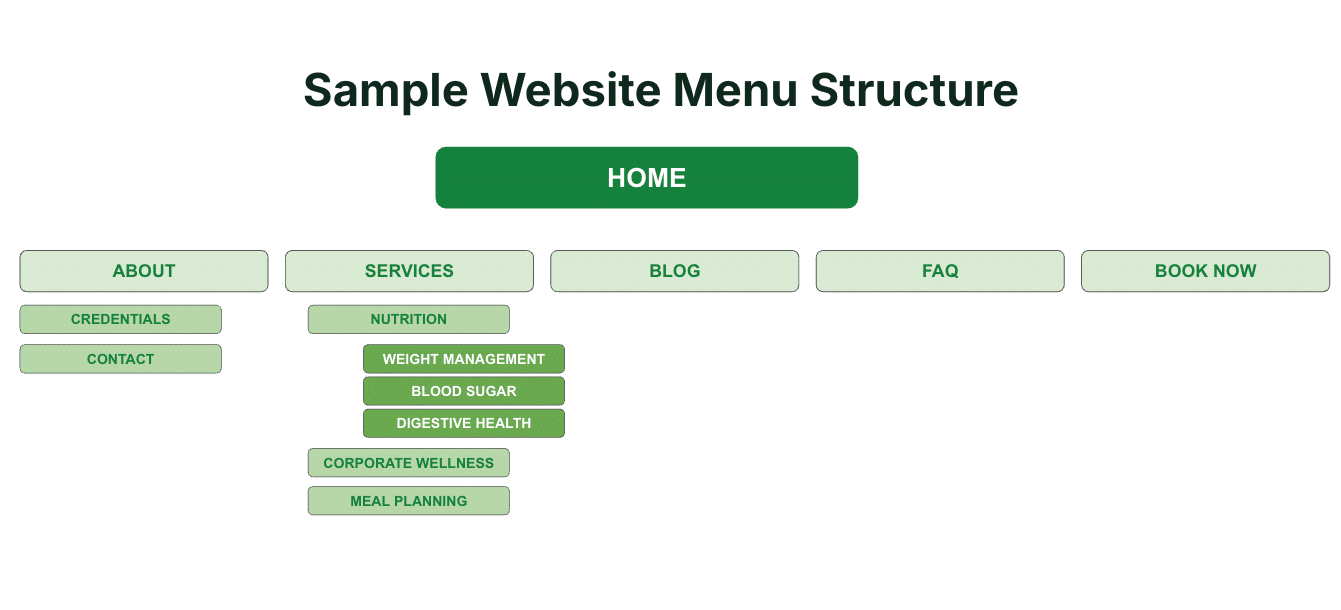
Notice that the navigation is simple and visitors aren’t overwhelmed with dozens of options the moment they land on the website.
Each major service has room to grow. As the practice expands, you can add new service pages, blog posts, FAQs, videos, and case studies without reorganizing your entire website.
Supporting content also has a purpose. Blog posts don’t exist just to “do SEO.” They’re written to answer questions, build trust, and guide readers toward a relevant service.
Most importantly, every page has a job.
Visitors know where they are, where they can go next, and how to become a client.
Common Mistakes to Avoid
By now, you’ve probably noticed a pattern. Most website planning mistakes are caused by skipping the planning process altogether.
Here are the biggest mistakes to watch for:
Trying to rank one page for everything.
A single Services page rarely does justice to everything you offer.
Creating too many service pages.
Not every service deserves its own page. Focus on quality over quantity.
Competing with yourself.
If multiple pages target the same keyword or answer the same question, you’re creating keyword cannibalization.
Treating every page like an island.
Your service pages, blog posts, FAQs, and related services should work together. Every page should have a clear next step.
Guessing what people search for.
The words you use to describe your services aren’t always the words your potential clients type into Google. Let keyword research guide your decisions.
Websites that generate clients don’t happen because someone got inspired. They happen because someone made a plan.

Final Thoughts on Planning Your Website Service Pages
Planning your website before you start writing might feel like an extra step, but it’s one of the best investments you can make.
A strategic website structure makes it easier for potential clients to find what they need, helps search engines understand your content, and gives you a roadmap for future pages, blog posts, and videos.
More importantly, it saves you from rewriting pages, reorganizing your navigation, and fixing problems that could have been avoided with a little planning upfront.
If you’ve made it this far and you’re thinking, “This makes sense…but I don’t have the time to do all of this,” I’ve got great news for you… .
By the time most business owners call me, they’ve reached one of two conclusions:
Either they think they need to throw their website away and start over…
Or they think one or two small changes will magically fix it.
Most of the time, neither is true.
What they actually need is a plan and that’s where we come in.
We’ll help you organize your services, identify the best SEO opportunities, map out a website that makes sense, and prioritize what to build first. Whether you need a few strategic changes or a complete redesign, you’ll know exactly what your website needs, and just as importantly, what it doesn’t.
Schedule a strategy call, and let’s build a website that’s organized from the start instead of trying to fix one after it’s already live.
I made a YouTube video where you can watch me go through this whole process.
Watch the video here or on my YouTube channel here.